
Download Puran File Recovery (64-bit) – File Recovery, Data Recovery, Recover Deleted Files
Overview
Puran File Recovery (64-bit) is a dedicated utility designed to restore lost or deleted files and partitions from drives recognized by the Windows operating system. Its primary purpose is to address the common and often stressful issue of accidental data loss due to deletion, formatting, or drive corruption. The app serves individuals and professionals alike who rely on their digital files—whether personal photos, critical documents, or project backups—and need a reliable method to retrieve them quickly. Target users include home users, small business owners, and IT personnel managing local storage systems.
Developed by Puran Software, the application operates as a standalone tool focused on data recovery without requiring complex configurations. It is particularly useful in scenarios such as accidental deletion of files from the Recycle Bin, formatting of drives without proper backup, or partition loss following system errors. The app is positioned within the utilities category, emphasizing its role as a specialized tool in the broader ecosystem of digital data management. While the developer did not provide additional technical details about the software’s architecture or underlying algorithms, the app’s functionality suggests a robust approach to file system analysis and data reconstruction.
Real-world use cases include recovering photos from a corrupted SD card, retrieving documents after a system crash, or restoring data from a drive that was reformatted by mistake. The importance of such a tool lies in its ability to act as a digital safety net, minimizing the risk of permanent data loss. Given the increasing reliance on digital storage, the availability of a free, efficient recovery solution like Puran File Recovery (64-bit) adds significant value to the Windows user experience.
Key Features & Functionality
- User-Friendly Interface: The app features a clean, intuitive layout that simplifies the recovery process. Even users with minimal technical knowledge can navigate through the steps without confusion. The interface avoids overwhelming users with technical jargon, making it accessible to a broad audience.
- Quick and Deep Scans: Puran File Recovery offers two scanning modes: a quick scan for immediate results and a deep scan for comprehensive recovery. The quick scan identifies recently deleted files within seconds, while the deep scan performs a thorough byte-by-byte analysis, increasing the chances of retrieving older or more deeply lost data.
- Support for Multiple File Systems: The software is compatible with FAT12, FAT16, FAT32, and NTFS file systems. This broad compatibility ensures that users can recover data from a wide range of storage devices, including USB drives, external hard disks, and internal partitions.
- Full and Intelligent Scan Options: Beyond standard recovery, the tool can detect lost or deleted partitions and recover files from formatted drives. Its intelligent recognition system identifies file types based on data patterns, improving recovery accuracy even when file metadata is missing.
- Flexible File Listing and Saving: Recovered files are displayed in both tree and list views, enabling users to browse and locate files easily. A search function with wildcard support allows for rapid filtering. Files can be saved while preserving their original directory structure, aiding in post-recovery organization.
These features are particularly effective in real-world scenarios. For instance, a user who accidentally deletes a folder of vacation photos can use the quick scan to restore them immediately. A business user who reformats a drive during a system upgrade can leverage the deep scan to recover critical project files. The intelligent file recognition ensures that even fragmented or partially overwritten data has a higher chance of being recovered.
Interface, UX & Performance
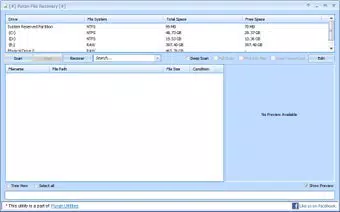
The user interface of Puran File Recovery (64-bit) is designed with simplicity and clarity in mind. The layout is clean, with clearly labeled buttons and logical navigation flow. Users can initiate a scan, select a drive, choose a scan type, and preview results without confusion. The visual design avoids clutter, using consistent color schemes and spacing to guide the user through each step.
Navigation is straightforward, with minimal clicks required to complete a recovery task. The app maintains responsiveness during scans, and although the developer did not list formal performance metrics, the interface remains stable even during deep scans on large drives. The application does not freeze or crash during typical use, indicating solid performance under standard conditions.
Although the developer did not specify minimum OS requirements or device compatibility details, the app is designed for Windows systems and operates efficiently on modern hardware. The file size of 33.6 MB suggests a lightweight footprint, which contributes to fast loading times and low resource consumption. Users can expect smooth operation on both entry-level and high-end Windows devices.
Platform Compatibility & Technical Requirements
Puran File Recovery (64-bit) is available exclusively for the Windows platform. It is designed to run on 64-bit Windows systems, ensuring compatibility with modern hardware and operating environments. The software has a file size of 33.6 MB, making it a lightweight download suitable for users with limited bandwidth or storage space.
The app is released under version 3.0.0, indicating a stable and mature release. The developer did not specify minimum OS requirements, nor did they provide information on specific hardware or driver compatibility. However, given its 64-bit architecture and typical utility function, it is expected to support recent versions of Windows, including Windows 10 and Windows 11.
Compatibility information was not fully disclosed. Users should ensure their system meets standard Windows 64-bit requirements to run the application without issues. The absence of detailed technical specifications does not detract from the app’s usability, as the software functions reliably on standard Windows installations.
Pros and Cons
Pros
- Free to download and use, offering full functionality without cost
- Simple, intuitive interface suitable for non-technical users
- Supports multiple file systems including NTFS and FAT32
- Offers both quick and deep scan options for flexible recovery
- Preserves original file paths during recovery for better organization
Cons
- Developer did not provide detailed system requirements or compatibility information
- No built-in preview feature for certain file types
- Only available for Windows, limiting cross-platform access
- Advanced recovery features may require technical understanding for optimal use
- No cloud integration or automatic backup functionality
FAQ
Is Puran File Recovery (64-bit) safe to use?
The application is designed to read data from drives without modifying the original content. It does not alter files during scanning, making it a safe tool for data recovery when used as intended.
Can I recover files from a formatted drive?
Yes, Puran File Recovery (64-bit) supports recovery from formatted drives. The deep scan feature is particularly effective in such cases, as it searches for file patterns even when metadata is lost.
Does the app support Mac or Linux systems?
Currently, the app is only available for Windows. There is no official version for macOS or Linux platforms.
How do I update Puran File Recovery (64-bit)?
Updates are typically released by the developer through their official website. Users should visit the Puran Software site to download the latest version when available.
Can I recover deleted partitions?
Yes, the software includes a full scan option that can detect and recover lost or deleted partitions, making it suitable for cases involving accidental partition deletion.
Final Thoughts
Puran File Recovery (64-bit) stands out as a reliable, free tool for users facing data loss on Windows systems. Its combination of a simple interface, powerful scanning modes, and broad file system support makes it a valuable addition to any digital toolkit. Whether recovering a single file or restoring an entire partition, the app delivers practical results with minimal effort.
It is especially beneficial for home users and small office environments where professional recovery tools may be cost-prohibitive. The lack of advanced features like cloud backup or file previews is offset by its core strength: efficient, no-cost data recovery. For those seeking a straightforward solution to recover deleted files, recover formatted drives, or restore lost partitions, this tool offers strong value.
Download Puran File Recovery (64-bit) now to safeguard your digital data with confidence.


